# For the developer: setting up sending and event parameters
Article: Custom events
The markup describes what action and at what moment needs to be recorded. The developer adds the sending to the app or server and transfers the parameters according to the agreed rules.
### How to send via the SDK
The developer adds an SDK method call to the place in the code where the selected action occurs. Use the instructions for the platform:
- [Android](https://appmetrica.yandex.ru/docs/en/sdk/android/analytics/android-operations#report-event)
- [iOS](https://appmetrica.yandex.ru/docs/en/sdk/ios/analytics/ios-operations#report-event)
- [Flutter](https://appmetrica.yandex.ru/docs/en/sdk/flutter/analytics/flutter-operations#report-event)
- [React Native](https://appmetrica.yandex.ru/docs/en/sdk/react-native/analytics/react-native-operations#report-event)
- [Unity](https://appmetrica.yandex.ru/docs/en/sdk/unity/analytics/unity-operations#report-event)
### How to send from the server
If the action information is available on the server, use [event upload via the Post API](https://appmetrica.yandex.ru/docs/en/mobile-api/post/post-import-events). Data is transferred via an HTTP request and linked to the profile or device identifier previously transferred via the SDK.
Before setup, check the [upload restrictions](https://appmetrica.yandex.ru/docs/en/mobile-api/post/restrictions). Post API data is synchronized once every four hours — take this into account when checking.
### Event nesting levels
To send an event with nested parameters, pass a `key:value` pair. In the interface, `key` and `value` are considered nesting levels.
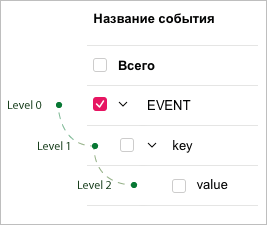
AppMetrica allows you to pass nested parameters in an event that can have multiple levels.
When passing parameters in JSON format, each new object in the value indicates a new nesting level, for example:
```json
{
"param1":"1",
"param2":"abc",
"param3": {
"paramLevel2": "2",
"param2Level2": {
"paramLevel3": "3",
"param2Level3":{
"level": "4"
}
}
}
}
```
The AppMetrica web interface displays up to five nesting levels for events. If an event has six or more levels, the top five are shown in the report.
You can use the [Reporting API](https://appmetrica.yandex.ru/docs/en/mobile-api/stat/intro) to get up to ten event nesting levels.
### Interpretation of numeric and string values
In the AppMetrica interface, the values `{"count" : 3}` and `{"count" : "3"}` are interpreted the same way. However, when exporting data using the Reporting API or [Logs API](https://appmetrica.yandex.ru/docs/en/mobile-api/logs/about), the parameter is exported in the form in which it was sent to the server.
If the same event is passed multiple times with different numeric parameter values, the parameter values are not aggregated in the web interface. Each value is recorded and calculated separately.
You can use the Reporting API to export additional fields: the total and average of all numeric values.
### Partially matched nested events
You can pass different parameter values with the same event at all times.
If the server receives events with repeated parameters, their values are accumulated, and the report displays the count of each passed variant.
If the server receives events with repeated parameters but different nesting depths, their values are accumulated based on the repeated parameters.
For example, the first event has two nesting levels:
```
{
"param1": "param2"
}
```
The second one has three nesting levels:
```
{
"param1": {
"param2": "value"
}
}
```
In the web interface, these events are displayed as a tree view:
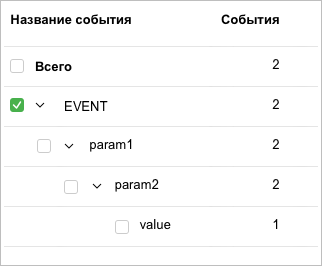
Events are counted using the following algorithm:
1. The event is recorded, along with two of its sublevels. 1 is added to each parameter.
2. 1 is added to the event name and three of its sublevels.